LG G Watch R Review

Introduction
Wearables have now moved past their first-generation, and with a little help from Google and its new Android Wear platform, we're now looking at offerings that are feeling a tad more solid and robust.
- Charging cradle with magnetic pins
- MicroUSB cable
- 0.85A AC charger
- Quick start manual
Design
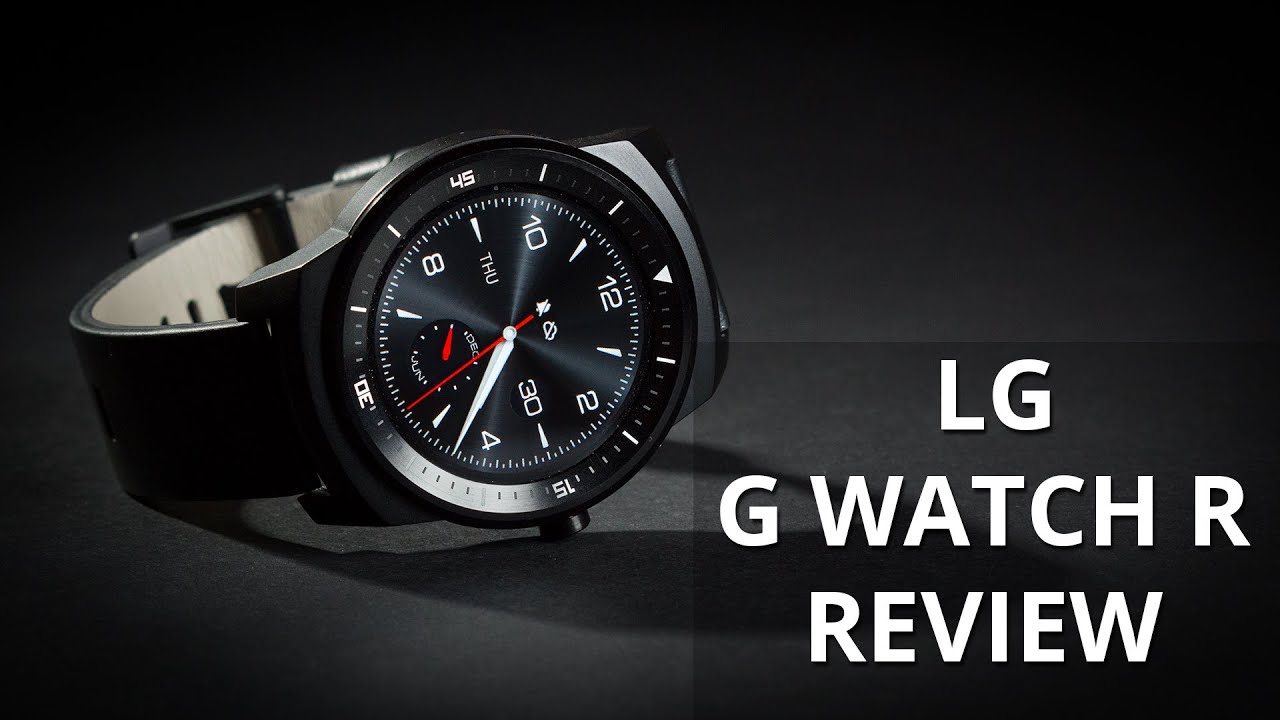
Three types of material are used with the LG G Watch R's body – genuine leather with the removable strap, metal for the watch face, and plastic at the bottom. These mesh together well and give the smartwatch a dignified feel – although we wouldn't go as far as comparing it with some of the more robust conventional time pieces on the market. That's because while the body inspires confidence in terms of its build, the leather strap is a bit of a letdown – it's hard to break in, making the process of unclasping the watch difficult, and it's honestly nothing special in terms of the texture and overall perceived quality. Thankfully, the 22 mm strap is interchangeable, so you could just get something more to you liking.
Display
Motorola may have won itself the title of being the first to out a round smartwatch, but we have to say that we were rather disappointed to see that the display itself is not actually a full circle – there's a fat horizontal strip that cuts into it at the bottom. With the G Watch R, however, we don't have this problem, as you get a “Full Circle” (as LG calls it), 1.3'' P-OLED display – a nice breath of fresh air after the many, many square displays we've gone through so far. The resolution of the display sits at 320x320, good for the excellent density of 247 pixels per inch. There are 6 levels of brightness available, but unless it's sunny outside, you likely won't have to set it higher than 2. Unfortunately, unlike the Moto 360, the Watch R doesn't feature an ambient light sensor, so it can't automatically adjust its brightness depending on your surrounding.
By default, the G Watch R comes with its screen set to be always-on, so that you can use it just like a normal watch. This drains the battery, however – even though the screen becomes monochrome – so we ended up turning it off. You can wake up the display easily by just taping on it, by clicking the crown, or by raising your wrist to your face as you would if you were to check the time on a normal watch – though you sometimes need to make the movement more pronounced for it to be picked up by the sensor, which is a bit irritating.
Interface and functionality
If you haven't come across Android Wear yet, the easiest way to imagine what it's all about is to think of it as an extension to Google Now. Voice commands and search, for example, are at the core of the OS, and the same “cards” with information that you'd get on your smartphone are also available on your smartwatch. For example, things like weather forecast, stock prices, flight and parcel tracking, reservations, and even navigation, will make an appearance if you have them set up on your phone. Navigating through these and, indeed, the whole UI, is done with taps and swipes up and down, left and right, which is easy enough. Unfortunately, if you have many cards (or apps), getting the information you're looking for can sometimes be a bit time-consuming – enough to be annoying on occasion. Thankfully, we're already seeing third-party developers working on Android Wear launchers, and at least one particular app solved this problem by giving us quick access to an app drawer.
Processor and memory
The LG G Watch R is powered by a 1.2GHz Qualcomm Snapdragon 400 chipset and 512MB of RAM. This configuration is capable of driving the software, and we stumbled upon no serious slowdowns or hiccups. That said, occasionally the frame rate drops a bit, and is noticeable by the trained eye, but performance is generally more than acceptable.
Connectivity
The LG G Watch R is pretty much useless on its own – it needs to be tethered to your smartphone (Android 4.3 or higher). The link between the two devices is established through the Bluetooth 4.0 module on board the watch itself, and the two will stay paired up even through several concrete walls, more than 30 feet away.
Speaking of pairing, in order to get your phone and watch to work together, you'll have to first download the Android Wear app off the Play Store. After that, you can use the hub to get compatible apps on your smartphone and then synchronize them with your Watch R.
Multimedia
You can't listen to music with the Watch R, as it has no speaker, but you can control playback of songs on your phone. Unfortunately, the Watch R does nothing more than offer basic playback controls (pause, previous/next song). There's also no gallery app to speak of and you can't watch videos on the watch (in case you wondered).
Calls
Unlike the Samsung Gear 2, which can hold calls thanks to its loudspeaker and microphone (even though they're still placed through your phone), the G Watch R will only vibrate when your phone is ringing. You can accept (or reject) a call on it, but that's about it – you'll still need to take out your phone and take up the call on it. In other words, the Watch R mostly takes the role of ensuring that you're not missing calls.
Battery life
Embedded within the body of the LG G Watch R is a Li-Polymer battery with a generous capacity of 410 mAh – more than you get with the Gear S (300 mAh) and Moto 360 (330 mAh). In our experience, the unit easily provided for a full day of even very hard usage, and we were able to squeeze out up to two days when using it as we would on average.
Conclusion
While smartwatches still have a long way to go until we can talk about mass adoption, it's fair to say that the LG G Watch R marks a definitive improvement over the previous generation. To a great extent, this has to do with Google's Android Wear OS, whose ecosystem of developers and apps seems to be growing slowly, but surely. The fact that LG has managed to craft a smartwatch that looks equal parts smart and watch, also has a lot to do with the appeal of the Watch R, and we expect more manufacturers to follow through and attack from that angle.

Follow us on Google News





Things that are NOT allowed:
To help keep our community safe and free from spam, we apply temporary limits to newly created accounts: