Microsoft Lumia 640 Review

Introduction
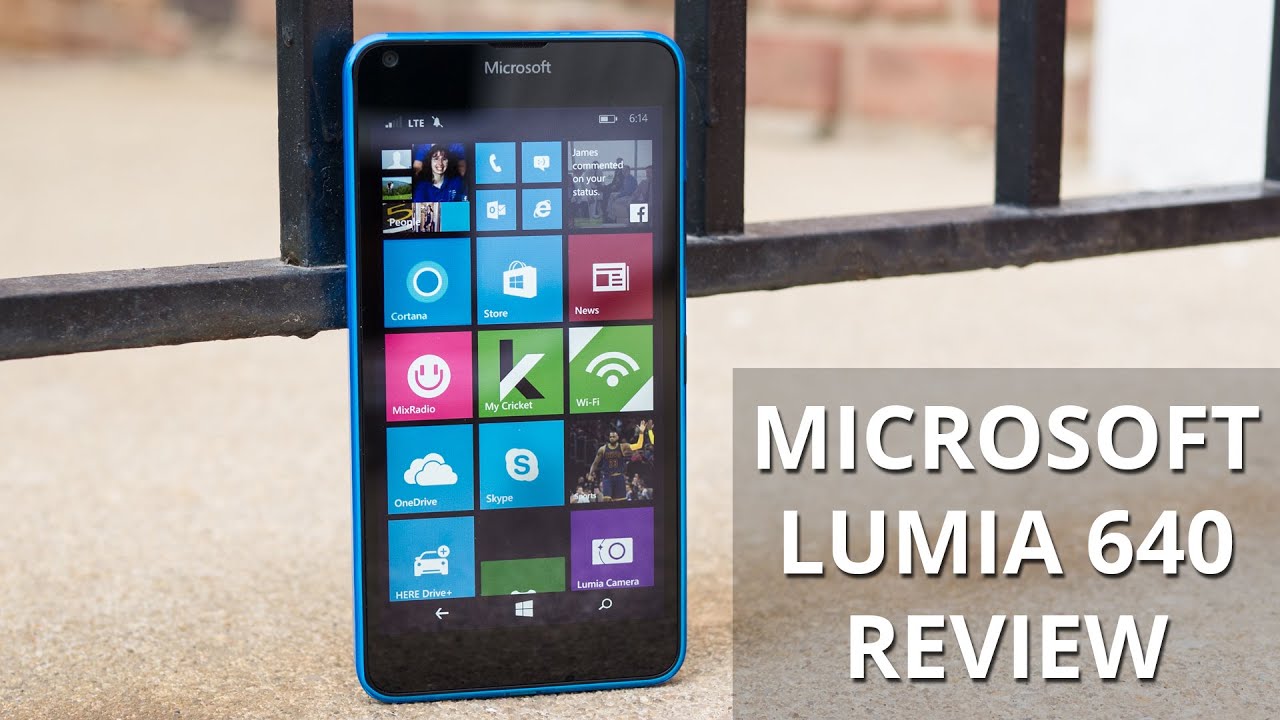
Alas, the Nokia name is no longer attached to Lumia, replaced instead by its new caretaker - Microsoft. The change became more pronounced during Mobile World Congress 2015 earlier this year, where both the Lumia 640 and 640 XL were unveiled at Microsoft’s press conference. High-end, flagship phones have been all the rage from its rivals, but Microsoft has opted instead to steer the direction of these phones towards the entry-level segment. In this review, we’re putting the Lumia 640 through some testing to see whether or not it’s something that can pique the interest of consumers. At the very least, though, some might be instantly dazzled by its hard-to-beat pricing of $129.99 as a prepaid option courtesy of Cricket Wireless.
- Lumia 640
- microUSB cable
- Wall charger
- Quick start guide
- Product and safety information
Design
Following in tradition, the Lumia 640’s design is distinctive and colorful.
While it’s billed as an affordable, entry-level offering, the Lumia 640 doesn’t fall victim to the handful of cheapo phones that are designed terribly – you know, the ones that look and feel cheap. Rather, there’s a pleasant balance present here, as it features the Lumia signature brightly-colored plastic body. From the front, it appears to exude a soft rectangle shape, but the rounded corners and high gloss finish of its casing definitely add some pep and pop to the design – enough to make it a visually appealing smartphone. And to that, there’s even a pleasant level of sturdiness attached to its construction.

5.56 x 2.84 x 0.35 inches
141.3 x 72.2 x 8.8 mm
5.11 oz (145 g)

5.83 x 2.81 x 0.43 inches
148.1 x 71.5 x 10.9 mm
5.47 oz (155 g)

5.54 x 2.76 x 0.27 inches
140.6 x 70.1 x 6.8 mm
4.59 oz (130 g)

5.71 x 2.83 x 0.32 inches
145 x 72 x 8.2 mm
5.15 oz (146 g)

5.56 x 2.84 x 0.35 inches
141.3 x 72.2 x 8.8 mm
5.11 oz (145 g)

5.83 x 2.81 x 0.43 inches
148.1 x 71.5 x 10.9 mm
5.47 oz (155 g)

5.54 x 2.76 x 0.27 inches
140.6 x 70.1 x 6.8 mm
4.59 oz (130 g)

5.71 x 2.83 x 0.32 inches
145 x 72 x 8.2 mm
5.15 oz (146 g)
Compare these and other phones using our Size Comparison tool.
Display
A generously sized display, it’s neither a wash, nor is it a visual feast.
This aggressively priced phone has been slapped with a sizable 5-inch 720 x 1280 ClearBlack IPS-LCD display with Gorilla Glass 3 on top for protection. Even though tiny text is still discernible from a normal viewing distance, it clearly lacks the sharpness, detail, and intensity that other higher resolution screens produce.
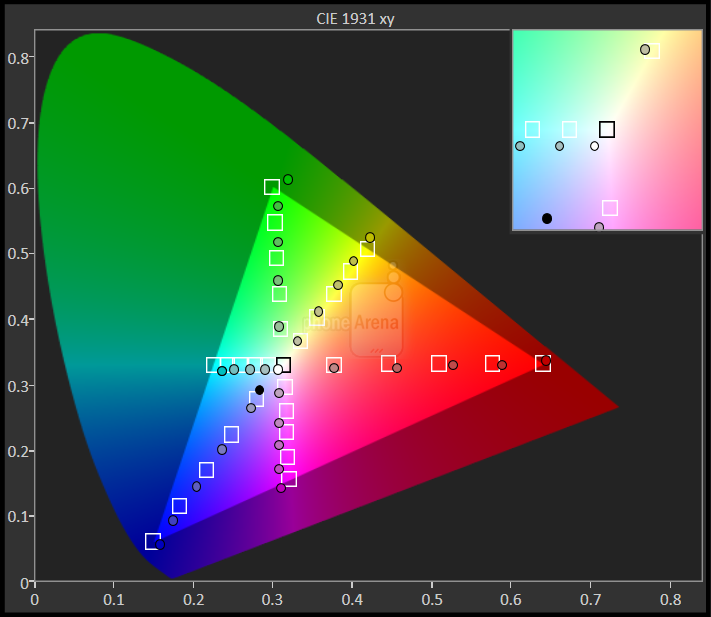
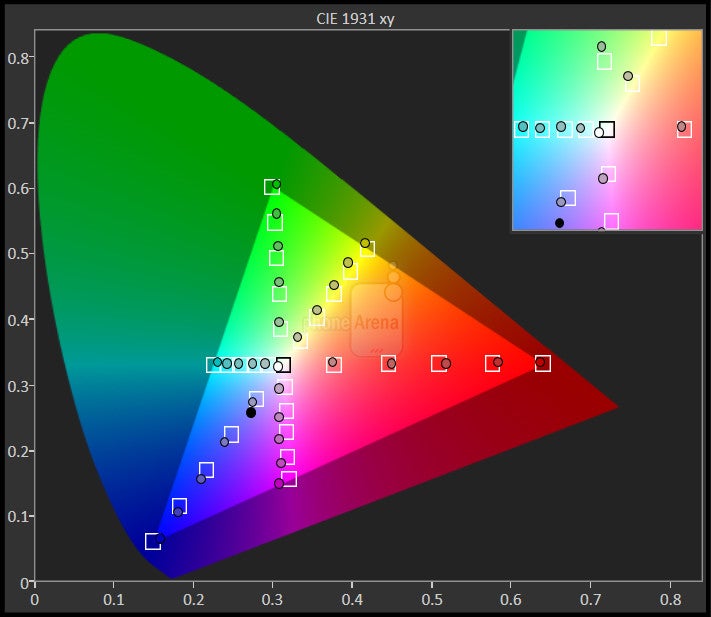
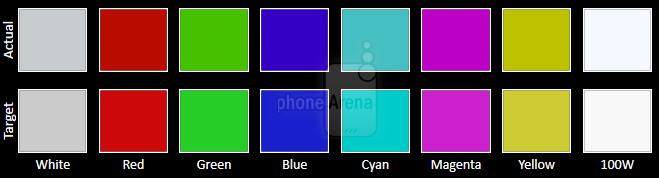
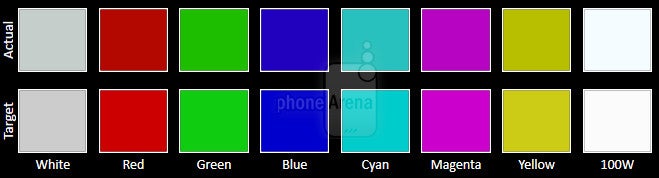
Other aspects about the display reveal that it’s actually a pretty well-made affair overall. In particular, its 6930K color temperature and gamma value of 2.25 are very close to the the reference marks of 6500K and 2.2, respectively, which is a great feature to find on such an entry-level phone.


Interface and Functionality
The Lumia 640 follows other handsets by offering the Windows Phone 8.1 with Lumia Denim experience.
In standard fashion, the Lumia 640 is running Windows Phone 8.1 with Lumia Denim in tow, which means it’s accompanied with Cortana integration and the entire suite of Lumia branded apps. Purists of the platform will find it familiar, naturally, seeing that the experience is identical to every other phone running this version of Windows Phone. We won’t get into the specifics of it all, but we can simply say that it’s always a work in progress – in the way that it’s still reaching, or catching up to its peers, but it definitely has that base functionality to compete.
Regardless, it has its perks to appease a wide array of users. On the productivity side, it’s preloaded with Microsoft Office to ensure we can edit and create documents and spreadsheets while on the road. Best of all, it’s on tap to receive the Windows 10 update when it comes out – so there’s peace of mind that ensures that owners won’t be left in the dust when the newest version of the platform is launched.
Processor and Memory
The Snapdragon 400 chip with 1GB RAM might seem insignificant, but for basic purposes, it’s more than enough.
By in large, Windows Phones have been known to be responsive, so we’re not all that surprised to see the Lumia 640 falling into the same boat as well. Ticking under the hood is a quad-core 1.2GHz Qualcomm Snapdragon 400 chip with 1GB of RAM – the kind of thing we’d expect to power this extremely affordable smartphone. Sure, it’s pretty smooth with its performance just navigating across the platform, but there are times when apps take some time to load. Putting it through some intensive stuff, such as 3D gaming, the phone’s performance clearly crumbles.
Internet and Connectivity
Internet Explorer serves its purpose well here with the Lumia 640. Combining its LTE connectivity, ample sized screen, and responsive navigational controls, it has all the elements necessary to deliver a pleasant web surfing experience. It might not have Google Chrome’s depth, but it serves its purpose on a superficial level.
Our particular review unit is the GSM version meant to play nicely with AT&T’s network domestically, but it’s assured to work with other GSM networks as well. Its other connectivity features include aGPS with Glonass, Bluetooth 4.0, 802.11 b/g/n Wi-Fi, and also NFC.
Camera
The camera serves its purpose, however, it underperforms with video recording and low light capture.
Lumia devices, in general, have this reputation of being graced with great cameras. However, that’s the thought for its high-end products, but for this mildly spec’d Lumia 640, it’s been outfitted with an 8-megapixel 1/4" sensor with an f/2.2 aperture lens and a single LED flash. Around the front, there’s a 0.9-megapixel snapper. No doubt, the specs won’t impress too many people, but it’s not the true telling of its capabilities.
Image quality from the 8-megapixel camera is actually surprisingly good, although nothing spectacular as far as details go. Even though its quality is sufficient enough for 4” x 6” printouts, we wouldn’t recommend trying to crop photos and then use them as printouts – just because it’s lacking in the fine detail department. The color department is where the Microsoft Lumia 640 impresses the most, as shots typically have a natural, slightly vivid appearance. Using its Rich Tone mode, it’s able to compensate contrasting areas where hard lighting blends with darker areas of the scenery, but in the process, it’s obvious that it favors an extremely artificial looking composition. However, the camera underperforms under low light due to its smudgy details and bland colors. Without question, the camera is capable of taking some slick looking shots, but at the same time, we find ourselves going through a lot of weak ones too.
Microsoft Lumia 640 sample images
Switching over to 1080p video capture, we’re not particularly won over by the results either. Details are somewhat sparse in intensity, but more pressing is how its white balance seems to be overly sensitive, as it can go from having a saturated color tone, to being bland and washed out. Adding to that, audio recording is rather thin sounding.

Multimedia
The speaker is underpowered in volume and emits shrill tones.
More than capable of handling video playback, you’ll want to make sure you’re looking at the display straight on due to the distortion that pops up at various angles. It’s not terrible, but can be a distraction with its washed out looks.
Call Quality
Voices are for the most part audible on both ends, but the volume could’ve been a smidgen stronger.
Battery
Nothing too extraordinary here, but at least battery life is decent.
In our experience, its 2500 mAh battery cell isn’t the beefiest thing around, but regardless of that, it’s more than ample to power us through a solid one-day of normal usage. Therefore, it’s at a level we feel to be average. Power users, however, will surely need to recharge it frequently if they intend on getting through a work day with it.
Conclusion
Everyone is eagerly awaiting for the next-gen Lumia smartphone, the one that’s specs heavy, feature-rich, and heavy handed against the competition. Well, we’re going to have to wait longer because the Microsoft Lumia 640 isn’t that handset. Rather, it’s on the other side of the spectrum – where it’s an entry-level, low cost handset meant for basic use.
Software version of the review unit:
Software: Windows Phone 8.1 Update 2
OS Version: 8.10.15127.138

Follow us on Google News




Things that are NOT allowed:
To help keep our community safe and free from spam, we apply temporary limits to newly created accounts: