There are plenty of Android keyboards out there, but Gboard is probably the best among them. However, there has been one issue with the keyboard that has plagued it for a long time. Fortunately, Google is finally fixing it, as per a recent report.
What's the problem with Gboard currently?
Similar to any other keyboard, Gboard also allows you to type in two ways: by manually tapping the letters or using voice commands. When you use the latter option, you need to bring the smartphone near your mouth so that the app can properly understand what you are trying to say.
Recommended For You
Generally, when you use a Bluetooth-enabled audio device like headphones or earbuds, you expect the app to take audio input from it. However, that doesn't happen, as support is currently not available in Google's keyboard app.
It will continue to use your phone's microphone even if you have headphones or earbuds connected. That means you won't benefit from having a Bluetooth audio device in a crowded place if you want to voice-type a message to someone. You'll eventually have to bring your device near your mouth so the app can understand what you're saying.
It's finally being addressed
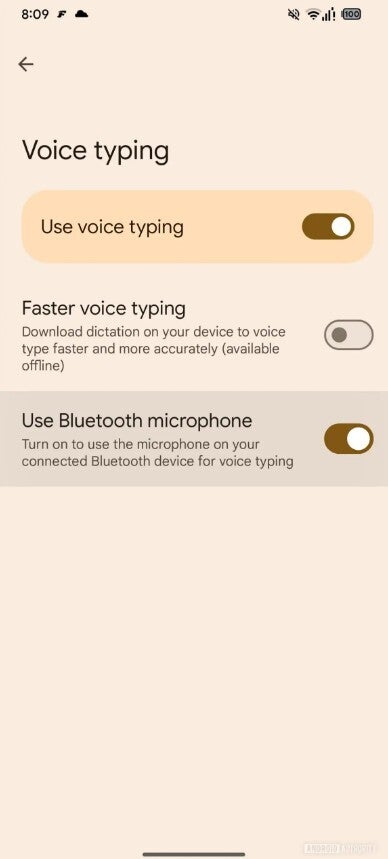
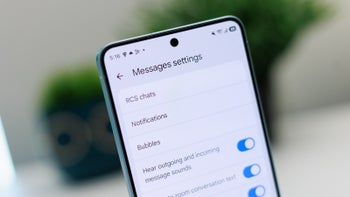
Use Bluetooth microphone option in Gboard settings. | Image by Android Authority
Many users have pointed out this shortcoming on various public forums, such as Reddit. After years of waiting, the Mountain View giant is apparently going to offer a capability that should have been present since Gboard's inception.
In Gboard beta version 17.1.2, a new option called "Use Bluetooth microphone" has been reportedly added to the voice typing section of the Gboard settings menu. Its description clearly explains its function: "Turn on to use the microphone on your connected Bluetooth device for voice typing." It basically means that, after enabling this toggle, Gboard will take the audio input from the connected Bluetooth device instead of the phone's microphone.
A server-side rollout is likely involved
The report mentions that the change appears in beta version 17.1.2 of the app. However, I can't find it on my phone. I have a Pixel 10 running the same beta build of Gboard, but no such option is present for me.
Recommended For You
Accessing the voice typing section currently gives me three options: faster voice typing, advanced voice features, and add punctuations. This suggests that there's a server-side rollout involved, meaning not everyone, even if they have the same app version, will see this new option on their phone.
Which keyboard you currently use on your phone?
Gboard isn't the only one
Gboard isn't the only third-party keyboard app that currently doesn't have the capability to voice type through Bluetooth earbuds or headphones. I've experienced a similar issue with Microsoft SwiftKey as well. However, options like Futo Keyboard include a dedicated setting called "Prefer Bluetooth Mic" to take audio input from a Bluetooth device.
While there's no official confirmation, I believe latency is to blame for its absence until now. As it turns out, using a Bluetooth audio device can bring slight latency that affects your typing experience. For instance, the app might recognize and type words a few seconds after they leave your mouth.
Furthermore, low-quality earbuds can lead to poor transcription quality. This may cause Gboard to misunderstand what you're saying and type the wrong words. For instance, Gboard voice typing may mistakenly interpret "I need flour" as "I need flower" due to poor transcription quality resulting from a low-quality audio product.
All this may make you believe that the issue is with Gboard or the other app you are using, which may affect its overall reputation. Fortunately, Google is working on a dedicated "Use Bluetooth microphone" option, which I'm certain will take care of this issue and the latency aspect.
However, it's worth noting that the new toggle has been spotted in a beta build. I've seen multiple times that a feature that appears fully baked doesn't get its stable release. So, I highly recommend holding your horses and waiting until Google officially announces this change.
Aman Kumar is a tech news writer with a long-standing passion for smartphones. Aman specializes in everything smartphones, from AI features like Pixel’s Camera Coach to understanding ideal hardware combinations. He loves breaking down complex features in a simple, clear way and hopes manufacturers bring back bold designs like the Nokia N-Gage. When he’s not writing, he’s either gaming on PUBG or talking fitness as a dedicated gym enthusiast.
A discussion is a place, where people can voice their opinion, no matter if it
is positive, neutral or negative. However, when posting, one must stay true to the topic, and not just share some
random thoughts, which are not directly related to the matter.
Things that are NOT allowed:
Off-topic talk - you must stick to the subject of discussion
Offensive, hate speech - if you want to say something, say it politely
Spam/Advertisements - these posts are deleted
Multiple accounts - one person can have only one account
Impersonations and offensive nicknames - these accounts get banned
To help keep our community safe and free from spam, we apply temporary limits to newly created accounts:
New accounts created within the last 24 hours may experience restrictions on how frequently they can
post or comment.
These limits are in place as a precaution and will automatically lift.
Moderation is done by humans. We try to be as objective as possible and moderate with zero bias. If you think a
post should be moderated - please, report it.
Have a question about the rules or why you have been moderated/limited/banned? Please,
contact us.









Things that are NOT allowed:
To help keep our community safe and free from spam, we apply temporary limits to newly created accounts: